> ## Documentation Index
> Fetch the complete documentation index at: https://private-7c7dfe99-parallel-read-in-order-multi-part.mintlify.site/llms.txt
> Use this file to discover all available pages before exploring further.
> The official Kafka connector from ClickHouse.
# ClickHouse Kafka Connect Sink
If you need any help, please [file an issue in the repository](https://github.com/ClickHouse/clickhouse-kafka-connect/issues) or raise a question in [ClickHouse public Slack](https://clickhouse.com/slack).
**ClickHouse Kafka Connect Sink** is the Kafka connector delivering data from a Kafka topic to a ClickHouse table.
License
The Kafka Connector Sink is distributed under the [Apache 2.0 License](https://www.apache.org/licenses/LICENSE-2.0)
Requirements for the environment
The [Kafka Connect](https://docs.confluent.io/platform/current/connect/index.html) framework v2.7 or later should be installed in the environment, running on Java 11 or later.
Version compatibility matrix
| ClickHouse Kafka Connect version | ClickHouse version | Kafka Connect | Confluent Platform | ClickHouse Java Client |
| - | - | - | - | - |
| 1.4.x (latest) | 23.3+ | 2.7+ | 6.1+ | 0.9.5 |
| 1.3.x | 23.3+ | 2.7+ | 6.1+ | 0.8.0 to 0.9.5 |
| 1.2.x | 23.3+ | 2.7+ | 6.1+ | 0.6.3 to 0.8.0 |
| 1.1.x | 23.3+ | 2.7+ | 6.1+ | 0.6.0 to 0.6.1 |
| 1.0.x | 23.3+ | 2.7+ | 6.1+ | 0.4.6 to 0.6.0 |
The connector refuses to start against ClickHouse servers older than 23.3. Always use the [latest release](https://github.com/ClickHouse/clickhouse-kafka-connect/releases/latest) unless you have a reason to pin an older version.
Main features
* Shipped with out-of-the-box exactly-once semantics. It's powered by a new ClickHouse core feature named [KeeperMap](https://github.com/ClickHouse/ClickHouse/pull/39976) (used as a state store by the connector) and allows for minimalistic architecture.
* Support for 3rd-party state stores: Currently defaults to In-memory but can use KeeperMap (Redis to be added soon).
* Core integration: Built, maintained, and supported by ClickHouse.
* Tested continuously against [ClickHouse Cloud](https://clickhouse.com/cloud).
* Data inserts with a declared schema and schemaless.
* Support for all data types of ClickHouse.
Installation instructions
Gather your connection details
To connect to ClickHouse with HTTP(S) you need this information:
| Parameter(s) | Description |
| - | - |
| `HOST` and `PORT` | Typically, the port is 8443 when using TLS or 8123 when not using TLS. |
| `DATABASE NAME` | Out of the box, there is a database named `default`, use the name of the database that you want to connect to. |
| `USERNAME` and `PASSWORD` | Out of the box, the username is `default`. Use the username appropriate for your use case. |
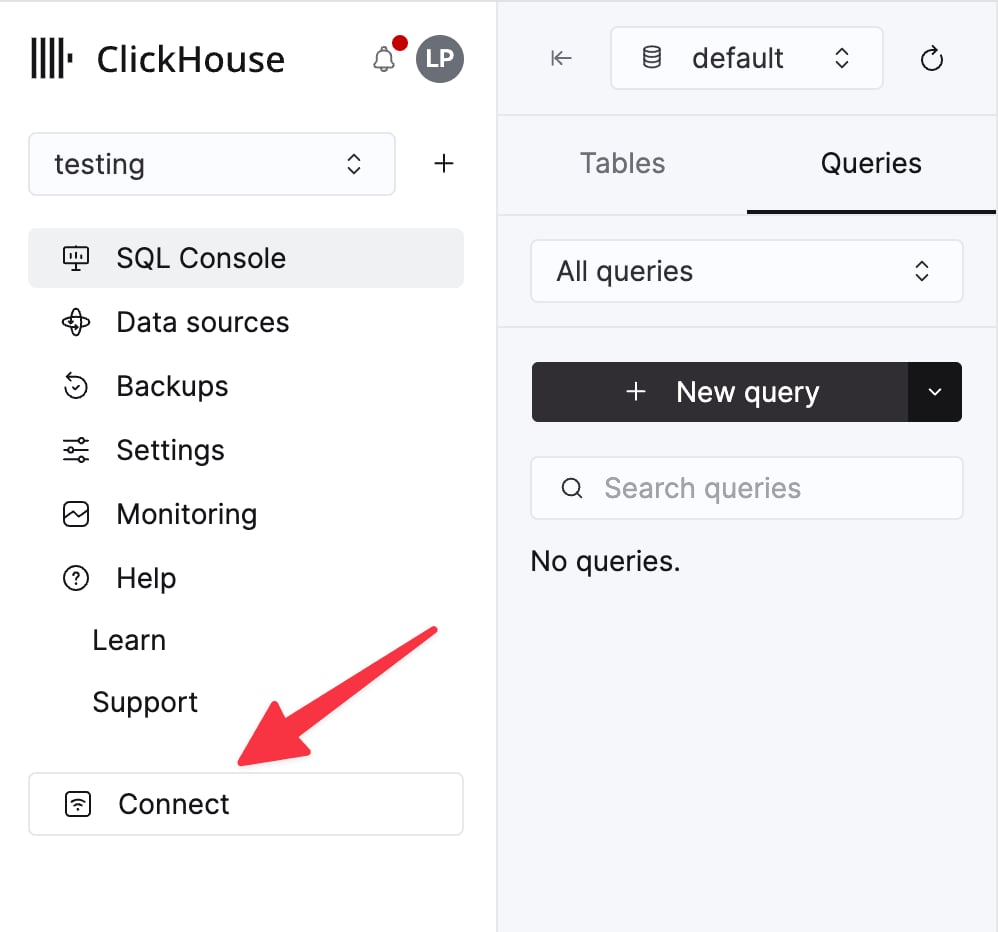
The details for your ClickHouse Cloud service are available in the ClickHouse Cloud console.
Select a service and click **Connect**:
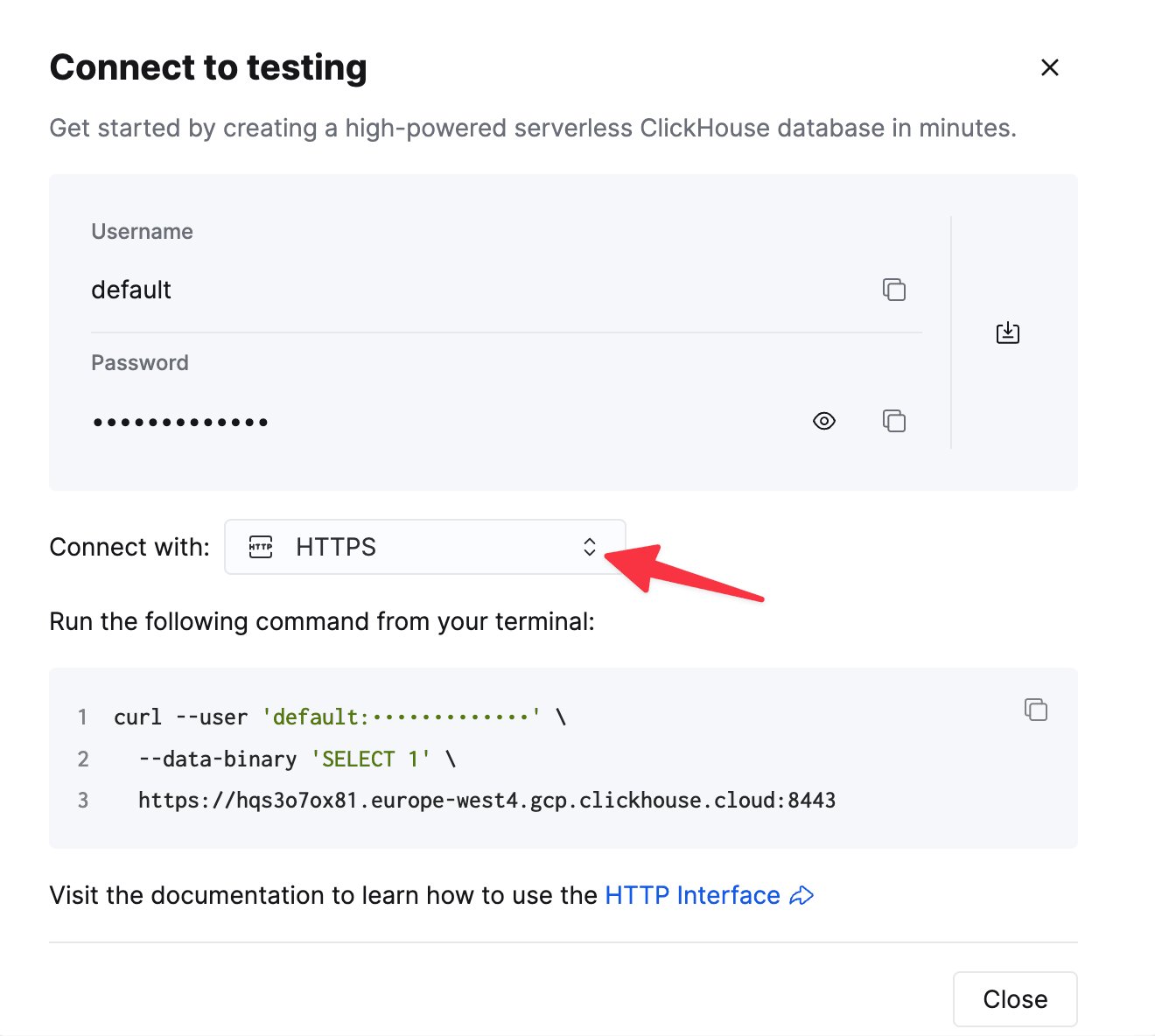
Choose **HTTPS**. Connection details are displayed in an example `curl` command.
If you're using self-managed ClickHouse, the connection details are set by your ClickHouse administrator.
General installation instructions
The connector is distributed as a single JAR file containing all the class files necessary to run the plugin.
To install the plugin, follow these steps:
* Download a zip archive containing the Connector JAR file from the [Releases](https://github.com/ClickHouse/clickhouse-kafka-connect/releases) page of ClickHouse Kafka Connect Sink repository.
* Extract the ZIP file content and copy it to the desired location.
* Add a path with the plugin director to [plugin.path](https://kafka.apache.org/documentation/#connectconfigs_plugin.path) configuration in your Connect properties file to allow Confluent Platform to find the plugin.
* Provide a topic name, ClickHouse instance hostname, and password in config.
```yml theme={null}
connector.class=com.clickhouse.kafka.connect.ClickHouseSinkConnector
tasks.max=1
topics=
ssl=true
jdbcConnectionProperties=?sslmode=STRICT
security.protocol=SSL
hostname=
database=
password=
ssl.truststore.location=/tmp/kafka.client.truststore.jks
port=8443
value.converter.schemas.enable=false
value.converter=org.apache.kafka.connect.json.JsonConverter
exactlyOnce=true
username=default
schemas.enable=false
```
* Restart the Confluent Platform.
* If you use Confluent Platform, log into Confluent Control Center UI to verify the ClickHouse Sink is available in the list of available connectors.
Configuration options
To connect the ClickHouse Sink to the ClickHouse server, you need to provide:
* connection details: hostname (**required**) and port (optional)
* user credentials: password (**required**) and username (optional)
* connector class: `com.clickhouse.kafka.connect.ClickHouseSinkConnector` (**required**)
* topics or topics.regex: the Kafka topics to poll - topic names must match table names (**required**)
* key and value converters: set based on the type of data on your topic. Required if not already defined in worker config.
The full table of configuration options:
| Property Name | Description | Default Value |
| - | - | - |
| `hostname` (Required) | The hostname or IP address of the server | N/A |
| `port` | The ClickHouse port - default is 8443 (for HTTPS in the cloud), but for HTTP (the default for self-hosted) it should be 8123 | `8443` |
| `ssl` | Enable ssl connection to ClickHouse | `true` |
| `jdbcConnectionProperties` | Connection properties when connecting to ClickHouse. Must start with `?` and joined by `&` between `param=value` | `""` |
| `username` | ClickHouse database username | `default` |
| `password` (Required) | ClickHouse database password | N/A |
| `database` | ClickHouse database name | `default` |
| `connector.class` (Required) | Connector Class(explicit set and keep as the default value) | `"com.clickhouse.kafka.connect.ClickHouseSinkConnector"` |
| `tasks.max` | The number of Connector Tasks | `"1"` |
| `errors.retry.timeout` | Kafka Connect max retry duction in milliseconds. `0` for no retries. `-1` for infinite retries. Recommended value is more then "10000" ms (10 seconds) Timeout | `"0"` |
| `exactlyOnce` | Exactly Once Enabled | `"false"` |
| `topics` (Required) | The Kafka topics to poll - topic names must match table names | `""` |
| `key.converter` (Required\* - See Description) | Set according to the types of your keys. Required here if you're passing keys (and not defined in worker config). | `"org.apache.kafka.connect.storage.StringConverter"` |
| `value.converter` (Required\* - See Description) | Set based on the type of data on your topic. Supported: - JSON, String, Avro or Protobuf formats. Required here if not defined in worker config. | `"org.apache.kafka.connect.json.JsonConverter"` |
| `value.converter.schemas.enable` | Connector Value Converter Schema Support | `"false"` |
| `errors.tolerance` | Connector Error Tolerance. Supported: none, all | `"none"` |
| `errors.deadletterqueue.topic.name` | If set (with errors.tolerance=all), a DLQ will be used for failed batches (see [Troubleshooting](#troubleshooting)) | `""` |
| `errors.deadletterqueue.context.headers.enable` | Adds additional headers for the DLQ | `""` |
| `clickhouseSettings` | Comma-separated list of ClickHouse settings (e.g. "insert\_quorum=2, etc...") | `""` |
| `topic2TableMap` | Comma-separated list that maps topic names to table names (e.g. "topic1=table1, topic2=table2, etc...") | `""` |
| `tableRefreshInterval` | Time (in seconds) to refresh the table definition cache | `0` |
| `keeperOnCluster` | Allows configuration of ON CLUSTER parameter for self-hosted instances (e.g. `ON CLUSTER clusterNameInConfigFileDefinition`) for exactly-once connect\_state table (see [Distributed DDL Queries](/reference/statements/distributed-ddl) | `""` |
| `bypassRowBinary` | Allows disabling use of RowBinary and RowBinaryWithDefaults for Schema-based data (Avro, Protobuf, etc.) - should only be used when data will have missing columns, and Nullable/Default are unacceptable | `"false"` |
| `dateTimeFormats` | Date time formats for parsing DateTime64 schema fields, separated by `;` (e.g. `someDateField=yyyy-MM-dd HH:mm:ss.SSSSSSSSS;someOtherDateField=yyyy-MM-dd HH:mm:ss`). | `""` |
| `tolerateStateMismatch` | Allows the connector to drop records "earlier" than the current offset stored AFTER\_PROCESSING (e.g. if offset 5 is sent, and offset 250 was the last recorded offset). Should be used to fix ingestion after failure and should be reverted back to `"false"` once done. | `"false"` |
| `ignorePartitionsWhenBatching` | Will ignore partition when collecting messages for insert (though only if `exactlyOnce` is `false`). Performance Note: The more connector tasks, the fewer kafka partitions assigned per task - this can mean diminishing returns. | `"false"` |
| `bufferCount` (since v1.3.6) | Number of records to buffer in memory before flushing to ClickHouse. `0` disables internal buffering. Buffering is not supported with `exactlyOnce=true`. | `"0"` |
| `bufferFlushTime` (since v1.3.6) | Maximum time in milliseconds to buffer records before flush when `exactlyOnce=false`. `0` disables time-based flushing. Default value is `0`. Only required for time-base threshold. Only effective when `bufferCount > 0`. | `"0"` |
| `reportInsertedOffsets` (since v1.3.6) | Enables returning only successfully inserted offsets from `preCommit` (instead of `currentOffsets`) when `exactlyOnce=false`. This does not apply when `ignorePartitionsWhenBatching=true`, where `currentOffsets` are still returned. | `"false"` |
| `client_version` (since v1.2.0) | Selects the [ClickHouse Java client](/integrations/language-clients/java/client) the connector uses. Valid values are `"V1"` and `"V2"`. | `"V1"` |
Target tables
ClickHouse Connect Sink reads messages from Kafka topics and writes them to appropriate tables. ClickHouse Connect Sink writes data into existing tables. Please, make sure a target table with an appropriate schema was created in ClickHouse before starting to insert data into it.
Each topic requires a dedicated target table in ClickHouse. The target table name must match the source topic name.
Pre-processing
If you need to transform outbound messages before they're sent to ClickHouse Kafka Connect
Sink, use [Kafka Connect Transformations](https://docs.confluent.io/platform/current/connect/transforms/overview.html).
Supported data types
**With a schema declared:**
| Kafka Connect Type | ClickHouse Type | Supported | Primitive |
| - | - | - | - |
| STRING | String | ✅ | Yes |
| STRING | JSON. See below (1) | ✅ | Yes |
| INT8 | Int8 | ✅ | Yes |
| INT16 | Int16 | ✅ | Yes |
| INT32 | Int32 | ✅ | Yes |
| INT64 | Int64 | ✅ | Yes |
| FLOAT32 | Float32 | ✅ | Yes |
| FLOAT64 | Float64 | ✅ | Yes |
| BOOLEAN | Boolean | ✅ | Yes |
| ARRAY | Array(T) | ✅ | No |
| MAP | Map(Primitive, T) | ✅ | No |
| STRUCT | Variant(T1, T2, ...) | ✅ | No |
| STRUCT | Tuple(a T1, b T2, ...) | ✅ | No |
| STRUCT | Nested(a T1, b T2, ...) | ✅ | No |
| STRUCT | JSON. See below (1), (2) | ✅ | No |
| BYTES | String | ✅ | No |
| org.apache.kafka.connect.data.Time | Int64 / DateTime64 | ✅ | No |
| org.apache.kafka.connect.data.Timestamp | Int32 / Date32 | ✅ | No |
| org.apache.kafka.connect.data.Decimal | Decimal | ✅ | No |
* (1) - JSON is supported only when ClickHouse settings has `input_format_binary_read_json_as_string=1`. This works only for RowBinary format family and the setting affects all columns in the insert request so they all should be a string. Connector will convert STRUCT to a JSON string in this case.
* (2) - When struct has unions like `oneof` then converter should be configured to NOT add prefix/suffix to a field names. There is `generate.index.for.unions=false` [setting for `ProtobufConverter`](https://docs.confluent.io/platform/current/schema-registry/connect.html#protobuf).
**Without a schema declared:**
A record is converted into JSON and sent to ClickHouse as a value in [JSONEachRow](/reference/formats/JSON/JSONEachRow) format.
Configuration recipes
These are some common configuration recipes to get you started quickly.
Basic configuration
The most basic configuration to get you started - it assumes you're running Kafka Connect in distributed mode and have a ClickHouse server running on `localhost:8443` with SSL enabled, data is in schemaless JSON.
```json theme={null}
{
"name": "clickhouse-connect",
"config": {
"connector.class": "com.clickhouse.kafka.connect.ClickHouseSinkConnector",
"tasks.max": "1",
"consumer.override.max.poll.records": "5000",
"consumer.override.max.partition.fetch.bytes": "5242880",
"database": "default",
"errors.retry.timeout": "60000",
"exactlyOnce": "false",
"hostname": "localhost",
"port": "8443",
"ssl": "true",
"jdbcConnectionProperties": "?ssl=true&sslmode=strict",
"username": "default",
"password": "",
"topics": "",
"value.converter": "org.apache.kafka.connect.json.JsonConverter",
"value.converter.schemas.enable": "false",
"clickhouseSettings": ""
}
}
```
The above connector config requires that you enable client overrides in your worker configuration via `connector.client.config.override.policy=All`. See the [Kafka Connect documentation](https://docs.confluent.io/platform/current/connect/references/allconfigs.html#override-the-worker-configuration) for more information.
Basic configuration with multiple topics
The connector can consume data from multiple topics
```json theme={null}
{
"name": "clickhouse-connect",
"config": {
"connector.class": "com.clickhouse.kafka.connect.ClickHouseSinkConnector",
...
"topics": "SAMPLE_TOPIC, ANOTHER_TOPIC, YET_ANOTHER_TOPIC",
...
}
}
```
Basic configuration with DLQ
```json theme={null}
{
"name": "clickhouse-connect",
"config": {
"connector.class": "com.clickhouse.kafka.connect.ClickHouseSinkConnector",
...
"errors.tolerance": "all",
"errors.deadletterqueue.topic.name": "",
"errors.deadletterqueue.context.headers.enable": "true",
}
}
```
Avro schema support
```json theme={null}
{
"name": "clickhouse-connect",
"config": {
"connector.class": "com.clickhouse.kafka.connect.ClickHouseSinkConnector",
...
"value.converter": "io.confluent.connect.avro.AvroConverter",
"value.converter.schema.registry.url": ":",
"value.converter.schemas.enable": "true",
}
}
```
Avro type mapping
The type mapping below is defined by `io.confluent.connect.avro.AvroConverter`, the official Avro serializer/deserializer implementation in Kafka Connect. See the Kafka Connect [docs](https://docs.confluent.io/platform/current/connect/userguide.html#avro) for advanced information on conversion logic.
✅: Supported
❌: Not supported
️⚠️: Partially supported
| Avro Type | Kafka Connect Type | Supported | Notes |
| - | - | - | - |
| null | *N/A* | ❌ | Not supported as a standalone type, but can be used in unions |
| boolean | BOOLEAN | ✅ | |
| int | INT8/INT16/INT32 | ✅ | Defaults to INT32. Resolves to INT8 if the schema has property `connect.type=int8` (analogously for INT16 if `connect.type=int16`) |
| long | INT64 | ✅ | |
| float | FLOAT32 | ✅ | |
| double | FLOAT64 | ✅ | |
| bytes | BYTES | ✅ | |
| string | STRING | ✅ | |
| record | STRUCT | ✅ | |
| enum | STRING | ✅ | |
| array | ARRAY/MAP | ✅ | Defaults to ARRAY. Resolves to MAP if the field was originally constructed via `AvroData.fromConnectSchema` ([source](https://github.com/confluentinc/schema-registry/blob/174907bfc0d9424e8d02e788f450f4afcdda1750/avro-data/src/main/java/io/confluent/connect/avro/AvroData.java#L943)) |
| map | MAP | ✅ | |
| union | STRUCT/`` | ⚠️ | Defaults to STRUCT. Resolves to the singleton type `T` in the union definition if `flatten.singleton.unions=true` (see [docs](https://docs.confluent.io/cloud/current/connectors/reference/connector-configuration.html#value-converter-flatten-singleton-unions)) |
| fixed | BYTES | ⚠️ | Fixed `decimal` logical type is not supported (see below) |
Refer to [Supported data types](#supported-data-types) for the mapping between Kafka Connect types and ClickHouse types.
Unsupported Avro schemas
The following Avro schemas are unsupported by the connector:
* fixed `decimal` logical type
```json theme={null}
{"name": "decimal_18_4", "type": "fixed", "size": 8, "logicalType": "decimal", "precision": 18, "scale": 4}
```
* nullable unions
```json theme={null}
{"name": "mixed_union", "type": ["null", "string", "int"], "default": null}
```
* record unions
```json theme={null}
{
"name": "record_union",
"type": [
{
"type": "record",
"name": "TypeA",
"fields": [
{
"name": "label",
"type": "string"
}
]
},
{
"type": "record",
"name": "TypeB",
"fields": [
{
"name": "count",
"type": "int"
}
]
}
]
}
```
Protobuf schema support
```json theme={null}
{
"name": "clickhouse-connect",
"config": {
"connector.class": "com.clickhouse.kafka.connect.ClickHouseSinkConnector",
...
"value.converter": "io.confluent.connect.protobuf.ProtobufConverter",
"value.converter.schema.registry.url": ":",
"value.converter.schemas.enable": "true",
}
}
```
Please note: if you encounter issues with missing classes, not every environment comes with the protobuf converter and you may need an alternate release of the jar bundled with dependencies.
Protobuf type mapping
The type mapping below is defined by `io.confluent.connect.protobuf.ProtobufConverter`, the official Protobuf serializer/deserializer implementation in Kafka Connect. See the Kafka Connect [docs](https://docs.confluent.io/platform/current/connect/userguide.html#json-schema-and-protobuf) for advanced information on conversion logic.
✅: Supported
❌: Not supported
️⚠️: Partially supported
| Protobuf Type | Kafka Connect Type | ClickHouse Type | Supported | Notes |
| :- | :- | :- | :- | :- |
| double | FLOAT64 | Float64 | ✅ | |
| float | FLOAT32 | Float32 | ✅ | |
| int32 | INT8/INT16/INT32 | Int32 | ✅ | Defaults to INT32. Resolves to INT8 if the schema has option `connect.type=int8` (analogously for INT16 if `connect.type=int16`) |
| sint32 | INT8/INT16/INT32 | Int32 | ✅ | Defaults to INT32. Resolves to INT8 if the schema has option `connect.type=int8` (analogously for INT16 if `connect.type=int16`) |
| sfixed32 | INT8/INT16/INT32 | Int32 | ✅ | Defaults to INT32. Resolves to INT8 if the schema has option `connect.type=int8` (analogously for INT16 if `connect.type=int16`) |
| uint32 | INT64 | UInt32 | ✅ | |
| fixed32 | INT64 | UInt32 | ✅ | |
| int64 | INT64 | Int64 | ✅ | |
| uint64 | INT64 | UInt64 | ✅ | |
| sint64 | INT64 | Int64 | ✅ | |
| fixed64 | INT64 | UInt64 | ✅ | |
| sfixed64 | INT64 | Int64 | ✅ | |
| bool | BOOLEAN | Bool | ✅ | |
| string | STRING | String | ✅ | |
| bytes | BYTES | String | ✅ | |
| enum | INT32/STRING | Int32 | ✅ | Defaults to STRING. Resolves to INT32 if `int.for.enums=true` (see [schema registry docs](https://docs.confluent.io/platform/current/schema-registry/connect.html#protobuf)) |
| message | STRUCT | Tuple / JSON | ⚠️ | See Unsupported schemas section below |
| repeated T (where T is not a map entry) | ARRAY | Array(T) | ✅ | |
| `map` | MAP | Map(K, V) | ✅ | |
| oneof | STRUCT | Tuple / Variant | ⚠️ | See section below on translating oneof to ClickHouse schema |
| google.protobuf.DoubleValue | FLOAT64 | Nullable(Float64) | ✅ | |
| google.protobuf.FloatValue | FLOAT32 | Nullable(Float32) | ✅ | |
| google.protobuf.Int64Value | INT64 | Nullable(Int64) | ✅ | |
| google.protobuf.UInt64Value | INT64 | Nullable(UInt64) | ✅ | |
| google.protobuf.UInt32Value | INT64 | Nullable(UInt32) | ✅ | |
| google.protobuf.Int32Value | INT32 | Nullable(Int32) | ✅ | |
| google.protobuf.BoolValue | BOOLEAN | Nullable(Bool) | ✅ | |
| google.protobuf.StringValue | STRING | Nullable(String) | ✅ | |
| google.protobuf.BytesValue | BYTES | Nullable(String) | ✅ | |
| google.protobuf.Timestamp | org.apache.kafka.connect.data.Timestamp | DateTime64(3) | ✅ | |
| google.type.Date | org.apache.kafka.connect.data.Date | Date | ✅ | |
| google.type.TimeOfDay | org.apache.kafka.connect.data.Time | Int32 / Int64 | ✅ | |
| google.protobuf.Duration | STRUCT | Tuple(`seconds` Int64, `nano` Nullable(Int32)) | ✅ | |
| google.protobuf.Any | *N/A* | *N/A* | ❌ | |
| google.protobuf.Empty | *N/A* | *N/A* | ❌ | |
Refer to [Supported data types](#supported-data-types) for the mapping between Kafka Connect types and ClickHouse types.
Note on translating `oneof` fields to ClickHouse columns
The connector does not support translating Protobuf unions (`oneof`) to the ClickHouse Variant type. Instead, list the `oneof` fields as individual nullable fields in your ClickHouse table schema.
For example:
```protobuf theme={null}
syntax = "proto3";
package com.clickhouse.kafka.connect.proto.test;
message StringIntUnion {
oneof mixed {
string mixed_string = 2;
int32 mixed_int = 3;
}
}
```
translates to the following ClickHouse table definition:
```sql theme={null}
CREATE TABLE IF NOT EXISTS `StringIntUnion`
(
mixed_string Nullable(String),
mixed_int Nullable(Int32)
) ENGINE = ...;
```
Unsupported Protobuf schemas
The following Protobuf schemas are unsupported by the connector on older ClickHouse versions:
* multi-message unions (**before CH version 26.1**, and before CH version 26.9 unless a setting is enabled, see below)
```protobuf theme={null}
syntax = "proto3";
package com.clickhouse.kafka.connect.proto.test;
message TwoRecords {
oneof payload {
TypeA type_a = 2;
TypeB type_b = 3;
}
// translates to Nullable(Tuple(label String)) in ClickHouse, which is unsupported before 26.1
message TypeA {
string label = 1;
}
// translates to Nullable(Tuple(count Int32)) in ClickHouse, which is unsupported before 26.1
message TypeB {
int32 count = 1;
}
}
```
From ClickHouse version 26.9 onwards, this schema is supported by default. In versions 26.1 to 26.8 it requires the setting `allow_experimental_nullable_tuple_type = 1` (see [this documentation page](/reference/settings/session-settings/enable#enable_nullable_tuple_type)).
JSON schema support
```json theme={null}
{
"name": "clickhouse-connect",
"config": {
"connector.class": "com.clickhouse.kafka.connect.ClickHouseSinkConnector",
...
"value.converter": "org.apache.kafka.connect.json.JsonConverter",
}
}
```
String support
The connector supports the String Converter in different ClickHouse formats: [JSON](/reference/formats/JSON/JSONEachRow), [CSV](/reference/formats/CSV/CSV), and [TSV](/reference/formats/TabSeparated/TabSeparated).
```json theme={null}
{
"name": "clickhouse-connect",
"config": {
"connector.class": "com.clickhouse.kafka.connect.ClickHouseSinkConnector",
...
"value.converter": "org.apache.kafka.connect.storage.StringConverter",
"customInsertFormat": "true",
"insertFormat": "CSV"
}
}
```
Internal buffering
Internal buffering allows the sink task to accumulate records from multiple `poll()` calls and flush them to ClickHouse as larger batches. This can improve throughput in workloads where each poll produces many small per-partition batches.
Key behavior:
* `bufferCount` controls how many records are buffered before flushing.
* `bufferFlushTime` sets a maximum wait time (in milliseconds) before flushing buffered records.
* `bufferFlushTime` is only effective when `bufferCount > 0`.
* `bufferCount=0` and `bufferFlushTime=0` keep buffering disabled (default behavior).
* Buffering is not supported when `exactlyOnce=true`.
Why buffering is incompatible with exactly-once mode:
Buffering changes batch boundaries, which breaks ClickHouse block deduplication and the connector offset state machine.\
To resolve this, either disable exactly-once mode with `exactlyOnce=false` in your connector config, or disable buffering with `bufferCount=0`.
Example:
```json theme={null}
{
"name": "clickhouse-connect",
"config": {
"connector.class": "com.clickhouse.kafka.connect.ClickHouseSinkConnector",
...
"exactlyOnce": "false",
"bufferCount": "5000",
"bufferFlushTime": "2000"
}
}
```
Logging
Logging is automatically provided by Kafka Connect Platform.
The logging destination and format might be configured via Kafka connect [configuration file](https://docs.confluent.io/platform/current/connect/logging.html#log4j-properties-file).
If using the Confluent Platform, the logs can be seen by running a CLI command:
```bash theme={null}
confluent local services connect log
```
For additional details check out the official [tutorial](https://docs.confluent.io/platform/current/connect/logging.html).
Monitoring
ClickHouse Kafka Connect reports runtime metrics via [Java Management Extensions (JMX)](https://www.oracle.com/technical-resources/articles/javase/jmx.html). JMX is enabled in Kafka Connector by default.
ClickHouse-Specific Metrics
The connector exposes custom metrics via the following MBean name:
```java theme={null}
com.clickhouse:type=ClickHouseKafkaConnector,name=SinkTask{id}
```
| Metric Name | Type | Description |
| - | - | - |
| `receivedRecords` | long | The total number of records received. |
| `recordProcessingTime` | long | Total time in nanoseconds spent grouping and converting records to a unified structure. |
| `taskProcessingTime` | long | Total time in nanoseconds spent processing and inserting data into ClickHouse. |
Kafka Producer/Consumer Metrics
The connector exposes standard Kafka producer and consumer metrics that provide insights into data flow, throughput, and performance.
**Topic-Level Metrics:**
* `records-sent-total`: Total number of records sent to the topic
* `bytes-sent-total`: Total bytes sent to the topic
* `record-send-rate`: Average rate of records sent per second
* `byte-rate`: Average bytes sent per second
* `compression-rate`: Compression ratio achieved
**Partition-Level Metrics:**
* `records-sent-total`: Total records sent to the partition
* `bytes-sent-total`: Total bytes sent to the partition
* `records-lag`: Current lag in the partition
* `records-lead`: Current lead in the partition
* `replica-fetch-lag`: Lag information for replicas
**Node-Level Connection Metrics:**
* `connection-creation-total`: Total connections created to the Kafka node
* `connection-close-total`: Total connections closed
* `request-total`: Total requests sent to the node
* `response-total`: Total responses received from the node
* `request-rate`: Average request rate per second
* `response-rate`: Average response rate per second
These metrics help monitor:
* **Throughput**: Track data ingestion rates
* **Lag**: Identify bottlenecks and processing delays
* **Compression**: Measure data compression efficiency
* **Connection Health**: Monitor network connectivity and stability
Kafka Connect Framework Metrics
The connector integrates with the Kafka Connect framework and exposes metrics for task lifecycle and error tracking.
**Task Status Metrics:**
* `task-count`: Total number of tasks in the connector
* `running-task-count`: Number of tasks currently running
* `paused-task-count`: Number of tasks currently paused
* `failed-task-count`: Number of tasks that have failed
* `destroyed-task-count`: Number of destroyed tasks
* `unassigned-task-count`: Number of unassigned tasks
Task status values include: `running`, `paused`, `failed`, `destroyed`, `unassigned`
**Error Metrics:**
* `deadletterqueue-produce-failures`: Number of failed DLQ writes
* `deadletterqueue-produce-requests`: Total DLQ write attempts
* `last-error-timestamp`: Timestamp of the last error
* `records-skip-total`: Total number of records skipped due to errors
* `records-retry-total`: Total number of records that were retried
* `errors-total`: Total number of errors encountered
**Performance Metrics:**
* `offset-commit-failures`: Number of failed offset commits
* `offset-commit-avg-time-ms`: Average time for offset commits
* `offset-commit-max-time-ms`: Maximum time for offset commits
* `put-batch-avg-time-ms`: Average time to process a batch
* `put-batch-max-time-ms`: Maximum time to process a batch
* `source-record-poll-total`: Total records polled
Monitoring Best Practices
1. **Monitor Consumer Lag**: Track `records-lag` per partition to identify processing bottlenecks
2. **Track Error Rates**: Watch `errors-total` and `records-skip-total` to detect data quality issues
3. **Observe Task Health**: Monitor task status metrics to ensure tasks are running properly
4. **Measure Throughput**: Use `records-send-rate` and `byte-rate` to track ingestion performance
5. **Monitor Connection Health**: Check node-level connection metrics for network issues
6. **Track Compression Efficiency**: Use `compression-rate` to optimize data transfer
For detailed JMX metric definitions and Prometheus integration, see the [jmx-export-connector.yml](https://github.com/ClickHouse/clickhouse-kafka-connect/blob/main/jmx-export-connector.yml) configuration file.
Limitations
* Deletes aren't supported.
* Batch size is inherited from the Kafka Consumer properties.
* When using KeeperMap for exactly-once and the offset is changed or re-wound, you need to delete the content from KeeperMap for that specific topic. (See troubleshooting guide below for more details)
This section covers performance tuning strategies for the ClickHouse Kafka Connect Sink. Performance tuning is essential when dealing with high-throughput use cases or when you need to optimize resource utilization and minimize lag.
Performance tuning is typically required in the following scenarios:
* **High-throughput workloads**: When processing millions of events per second from Kafka topics
* **Consumer lag**: When your connector can't keep up with the rate of data production, causing increasing lag
* **Resource constraints**: When you need to optimize CPU, memory, or network usage
* **Multiple topics**: When consuming from multiple high-volume topics simultaneously
* **Small message sizes**: When dealing with many small messages that would benefit from server-side batching
Performance tuning is **NOT typically needed** when:
* You're processing low to moderate volumes (\< 10,000 messages/second)
* Consumer lag is stable and acceptable for your use case
* Default connector settings already meet your throughput requirements
* Your ClickHouse cluster can easily handle the incoming load
Understanding the data flow
Before tuning, it's important to understand how data flows through the connector:
1. **Kafka Connect Framework** fetches messages from Kafka topics in the background
2. **Connector polls** for messages from the framework's internal buffer
3. **Connector batches** messages based on poll size
4. **ClickHouse receives** the batched insert via HTTP/S
5. **ClickHouse processes** the insert (synchronously or asynchronously)
Performance can be optimized at each of these stages.
Kafka Connect batch size tuning
The first level of optimization is controlling how much data the connector receives per batch from Kafka.
Fetch settings
Kafka Connect (the framework) fetches messages from Kafka topics in the background, independent of the connector:
* **`fetch.min.bytes`**: Minimum amount of data before the framework passes values to the connector (default: 1 byte)
* **`fetch.max.bytes`**: Maximum amount of data to fetch in a single request (default: 52428800 / 50 MB)
* **`fetch.max.wait.ms`**: Maximum time to wait before returning data if `fetch.min.bytes` isn't met (default: 500 ms)
On Confluent Cloud, adjustment of these settings requires opening a support case through Confluent Cloud.
Poll settings
The connector polls for messages from the framework's buffer:
* **`max.poll.records`**: Maximum number of records returned in a single poll (default: 500)
* **`max.partition.fetch.bytes`**: Maximum amount of data per partition (default: 1048576 / 1 MB)
On Confluent Cloud, adjustment of these settings requires opening a support case through Confluent Cloud.
Recommended settings for high throughput
For optimal performance with ClickHouse, aim for larger batches:
```properties theme={null}
# Increase the number of records per poll
consumer.override.max.poll.records=5000
# Increase the partition fetch size (5 MB)
consumer.override.max.partition.fetch.bytes=5242880
# Optional: Increase minimum fetch size to wait for more data (1 MB)
consumer.override.fetch.min.bytes=1048576
# Optional: Reduce wait time if latency is critical
consumer.override.fetch.max.wait.ms=300
```
The above properties require that you enable client overrides in your worker configuration via `connector.client.config.override.policy=All`. See the [Kafka Connect documentation](https://docs.confluent.io/platform/current/connect/references/allconfigs.html#override-the-worker-configuration) for more information.
**Important**: Kafka Connect fetch settings represent compressed data, while ClickHouse receives uncompressed data. Balance these settings based on your compression ratio.
**Trade-offs**:
* **Larger batches** = Better ClickHouse ingestion performance, fewer parts, lower overhead
* **Larger batches** = Higher memory usage, potential increased end-to-end latency
* **Too large batches** = Risk of timeouts, OutOfMemory errors, or exceeding `max.poll.interval.ms`
More details: [Confluent documentation](https://docs.confluent.io/platform/current/connect/references/allconfigs.html#override-the-worker-configuration) | [Kafka documentation](https://kafka.apache.org/documentation/#consumerconfigs)
Asynchronous inserts
Asynchronous inserts are a powerful feature when the connector sends relatively small batches or when you want to further optimize ingestion by shifting batching responsibility to ClickHouse.
When to use async inserts
Consider enabling async inserts when:
* **Many small batches**: Your connector sends frequent small batches (\< 1000 rows per batch)
* **High concurrency**: Multiple connector tasks are writing to the same table
* **Distributed deployment**: Running many connector instances across different hosts
* **Part creation overhead**: You're experiencing "too many parts" errors
* **Mixed workload**: Combining real-time ingestion with query workloads
Do **NOT** use async inserts when:
* You're already sending large batches (> 10,000 rows per batch) with controlled frequency
* You require immediate data visibility (queries must see data instantly)
* Exactly-once semantics with `wait_for_async_insert=0` conflicts with your requirements
* Your use case can benefit from client-side batching improvements instead
How async inserts work
With asynchronous inserts enabled, ClickHouse:
1. Receives the insert query from the connector
2. Writes data to an in-memory buffer (instead of immediately to disk)
3. Returns success to the connector (if `wait_for_async_insert=0`)
4. Flushes the buffer to disk when one of these conditions is met:
* Buffer reaches `async_insert_max_data_size` (default: 100 MB)
* `async_insert_busy_timeout_ms` milliseconds elapsed since first insert (default: 1000 ms)
* Maximum number of queries accumulated (`async_insert_max_query_number`, default: 100)
This significantly reduces the number of parts created and improves overall throughput.
Enabling async inserts
Add async insert settings to the `clickhouseSettings` configuration parameter:
```json theme={null}
{
"name": "clickhouse-connect",
"config": {
"connector.class": "com.clickhouse.kafka.connect.ClickHouseSinkConnector",
...
"clickhouseSettings": "async_insert=1,wait_for_async_insert=1"
}
}
```
**Key settings**:
* **`async_insert=1`**: Enable asynchronous inserts
* **`wait_for_async_insert=1`** (recommended): Connector waits for data to be flushed to ClickHouse storage before acknowledging. Provides delivery guarantees.
* **`wait_for_async_insert=0`**: Connector acknowledges immediately after buffering. Better performance but data may be lost on server crash before flush.
Tuning async insert behavior
You can fine-tune the async insert flush behavior:
```json theme={null}
"clickhouseSettings": "async_insert=1,wait_for_async_insert=1,async_insert_max_data_size=104857600,async_insert_busy_timeout_ms=1000"
```
Common tuning parameters:
* **`async_insert_max_data_size`** (default: 104857600 / 100 MB): Maximum buffer size before flush
* **`async_insert_busy_timeout_ms`** (default: 1000): Maximum time (ms) before flush
* **`async_insert_stale_timeout_ms`** (default: 0): Time (ms) since last insert before flush
* **`async_insert_max_query_number`** (default: 100): Maximum queries before flush
**Trade-offs**:
* **Benefits**: Fewer parts, better merge performance, lower CPU overhead, improved throughput under high concurrency
* **Considerations**: Data not immediately queryable, slightly increased end-to-end latency
* **Risks**: Data loss on server crash if `wait_for_async_insert=0`, potential memory pressure with large buffers
Async inserts with exactly-once semantics
When using `exactlyOnce=true` with async inserts:
```json theme={null}
{
"config": {
"exactlyOnce": "true",
"clickhouseSettings": "async_insert=1,wait_for_async_insert=1"
}
}
```
**Important**: Always use `wait_for_async_insert=1` with exactly-once to ensure offset commits happen only after data is persisted.
For more information about async inserts, see the [ClickHouse async inserts documentation](/concepts/best-practices/selecting-an-insert-strategy#asynchronous-inserts).
Connector parallelism
Increase parallelism to improve throughput:
Tasks per connector
```json theme={null}
"tasks.max": "4"
```
Each task processes a subset of topic partitions. More tasks = more parallelism, but:
* Maximum effective tasks = number of topic partitions
* Each task maintains its own connection to ClickHouse
* More tasks = higher overhead and potential resource contention
**Recommendation**: Start with `tasks.max` equal to the number of topic partitions, then adjust based on CPU and throughput metrics.
Ignoring partitions when batching
By default, the connector batches messages per partition. For higher throughput, you can batch across partitions:
```json theme={null}
"ignorePartitionsWhenBatching": "true"
```
\*\* Warning\*\*: Only use when `exactlyOnce=false`. This setting can improve throughput by creating larger batches but loses per-partition ordering guarantees.
Multiple high throughput topics
If your connector is configured to subscribe to multiple topics, you're using `topic2TableMap` to map topics to tables, and you're experiencing a bottleneck at insertion resulting in consumer lag, consider creating one connector per topic instead.
The main reason why this happens is that currently batches are inserted into every table [serially](https://github.com/ClickHouse/clickhouse-kafka-connect/blob/578ac07e8be1a920aaa3b26e49183595c3edd04b/src/main/java/com/clickhouse/kafka/connect/sink/ProxySinkTask.java#L95-L100).
**Recommendation**: For multiple high-volume topics, deploy one connector instance per topic to maximize parallel insert throughput.
ClickHouse table engine considerations
Choose the appropriate ClickHouse table engine for your use case:
* **`MergeTree`**: Best for most use cases, balances query and insert performance
* **`ReplicatedMergeTree`**: Required for high availability, adds replication overhead
* **`*MergeTree` with proper `ORDER BY`**: Optimize for your query patterns
**Settings to consider**:
```sql theme={null}
CREATE TABLE my_table (...)
ENGINE = MergeTree()
ORDER BY (timestamp, id)
SETTINGS
-- Increase max insert threads for parallel part writing
max_insert_threads = 4,
-- Allow inserts with quorum for reliability (ReplicatedMergeTree)
insert_quorum = 2
```
For connector-level insert settings:
```json theme={null}
"clickhouseSettings": "insert_quorum=2,insert_quorum_timeout=60000"
```
Connection pooling and timeouts
The connector maintains HTTP connections to ClickHouse. Adjust timeouts for high-latency networks:
```json theme={null}
"jdbcConnectionProperties": "?socket_timeout=300000,connection_timeout=30000"
```
* **`socket_timeout`** (default: 30000 ms): Maximum time for read operations
* **`connection_timeout`** (default: 10000 ms): Maximum time to establish connection
Increase these values if you experience timeout errors with large batches.
Client network buffer
When using client V2 (`"client_version": "V2"`), data is copied between the socket and application memory through a buffer controlled by `client_network_buffer_size` (in bytes). The default size is `300000` bytes. A larger buffer can improve throughput on high-latency or high-bandwidth links, but increases memory usage per connection task.
All client options are configured via `jdbcConnectionProperties` rather than `clickhouseSettings`. For example:
```json theme={null}
"jdbcConnectionProperties": "?client_network_buffer_size=1000000"
```
If you need to configure multiple client properties, join them with `&`:
```json theme={null}
"jdbcConnectionProperties": "?ssl=true&client_network_buffer_size=1000000"
```
Monitor these key metrics:
1. **Consumer lag**: Use Kafka monitoring tools to track lag per partition
2. **Connector metrics**: Monitor `receivedRecords`, `recordProcessingTime`, `taskProcessingTime` via JMX (see [Monitoring](#monitoring))
3. **ClickHouse metrics**:
* `system.asynchronous_inserts`: Monitor async insert buffer usage
* `system.parts`: Monitor part count to detect merge issues
* `system.merges`: Monitor active merges
* `system.events`: Track `InsertedRows`, `InsertedBytes`, `FailedInsertQuery`
**Common performance issues**:
| Symptom | Possible Cause | Solution |
| - | - | - |
| High consumer lag | Batches too small | Increase `max.poll.records`, enable async inserts |
| "Too many parts" errors | Small frequent inserts | Enable async inserts, increase batch size |
| Timeout errors | Large batch size, slow network | Reduce batch size, increase `socket_timeout`, check network |
| High CPU usage | Too many small parts | Enable async inserts, increase merge settings |
| OutOfMemory errors | Batch size too large | Reduce `max.poll.records`, `max.partition.fetch.bytes` |
| Uneven task load | Uneven partition distribution | Rebalance partitions or adjust `tasks.max` |
1. **Start with defaults**, then measure and tune based on actual performance
2. **Prefer larger batches**: Aim for 10,000-100,000 rows per insert when possible
3. **Use async inserts** when sending many small batches or under high concurrency
4. **Always use `wait_for_async_insert=1`** with exactly-once semantics
5. **Scale horizontally**: Increase `tasks.max` up to the number of partitions
6. **One connector per high-volume topic** for maximum throughput
7. **Monitor continuously**: Track consumer lag, part count, and merge activity
8. **Test thoroughly**: Always test configuration changes under realistic load before production deployment
Example: High-throughput configuration
Here's a complete example optimized for high throughput:
```json theme={null}
{
"name": "clickhouse-high-throughput",
"config": {
"connector.class": "com.clickhouse.kafka.connect.ClickHouseSinkConnector",
"tasks.max": "8",
"topics": "high_volume_topic",
"hostname": "my-clickhouse-host.cloud",
"port": "8443",
"database": "default",
"username": "default",
"password": "",
"ssl": "true",
"value.converter": "org.apache.kafka.connect.json.JsonConverter",
"value.converter.schemas.enable": "false",
"exactlyOnce": "false",
"ignorePartitionsWhenBatching": "true",
"consumer.override.max.poll.records": "10000",
"consumer.override.max.partition.fetch.bytes": "5242880",
"consumer.override.fetch.min.bytes": "1048576",
"consumer.override.fetch.max.wait.ms": "500",
"clickhouseSettings": "async_insert=1,wait_for_async_insert=1,async_insert_max_data_size=16777216,async_insert_busy_timeout_ms=1000,socket_timeout=300000"
}
}
```
The above connector config requires that you enable client overrides in your worker configuration via `connector.client.config.override.policy=All`. See the [Kafka Connect documentation](https://docs.confluent.io/platform/current/connect/references/allconfigs.html#override-the-worker-configuration) for more information.
**This configuration**:
* Processes up to 10,000 records per poll
* Batches across partitions for larger inserts
* Uses async inserts with 16 MB buffer
* Runs 8 parallel tasks (match your partition count)
* Optimized for throughput over strict ordering
Troubleshooting
"State mismatch for topic `[someTopic]` partition `[0]`"
This happens when the offset stored in KeeperMap is different from the offset stored in Kafka, usually when a topic has been deleted
or the offset has been manually adjusted.
To fix this, you would need to delete the old values stored for that given topic + partition:
```sql theme={null}
-- First, identify the database used to store the data.
SELECT * FROM [database].connect_state
-- Identify the key that matches the topic and partition.
ALTER TABLE [database].connect_state DELETE WHERE key = [keyname]
```
This adjustment may have exactly-once implications.
"What errors will the connector retry?"
Right now the focus is on identifying errors that are transient and can be retried, including:
* `ClickHouseException` - This is a generic exception that can be thrown by ClickHouse.
It is usually thrown when the server is overloaded and the following error codes are considered particularly transient:
* 3 - UNEXPECTED\_END\_OF\_FILE
* 107 - FILE\_DOESNT\_EXIST
* 159 - TIMEOUT\_EXCEEDED
* 164 - READONLY
* 202 - TOO\_MANY\_SIMULTANEOUS\_QUERIES
* 203 - NO\_FREE\_CONNECTION
* 209 - SOCKET\_TIMEOUT
* 210 - NETWORK\_ERROR
* 241 - MEMORY\_LIMIT\_EXCEEDED
* 242 - TABLE\_IS\_READ\_ONLY
* 252 - TOO\_MANY\_PARTS
* 285 - TOO\_FEW\_LIVE\_REPLICAS
* 319 - UNKNOWN\_STATUS\_OF\_INSERT
* 425 - SYSTEM\_ERROR
* 999 - KEEPER\_EXCEPTION
* `SocketTimeoutException` - This is thrown when the socket times out.
* `UnknownHostException` - This is thrown when the host can't be resolved.
* `IOException` - This is thrown when there is a problem with the network.
"All my data is blank/zeroes"
Likely the fields in your data don't match the fields in the table - this is especially common with CDC (and the Debezium format).
One common solution is to add the flatten transformation to your connector configuration:
```properties theme={null}
transforms=flatten
transforms.flatten.type=org.apache.kafka.connect.transforms.Flatten$Value
transforms.flatten.delimiter=_
```
This will transform your data from a nested JSON to a flattened JSON (using `_` as a delimiter). Fields in the table would then follow the "field1\_field2\_field3" format (i.e. "before\_id", "after\_id", etc.).
"I want to use my Kafka keys in ClickHouse"
Kafka keys aren't stored in the value field by default, but you can use the `KeyToValue` transformation to move the key to the value field (under a new `_key` field name):
```properties theme={null}
transforms=keyToValue
transforms.keyToValue.type=com.clickhouse.kafka.connect.transforms.KeyToValue
transforms.keyToValue.field=_key
```